
Simple Pop Art Effect With Photoshop
In this Photoshop Effects tutorial, we're going to see how to turn a photo into a simple 1950's and 60's pop art-style effect. If you can make a selection with the Lasso tool and you understand the basics of using layers in Photoshop, you have all the skills needed to create the effect. We're going to be using the Lasso tool, or the selection tool of your choice, a simple Threshold image adjustment, and a lot of solid color fill layers.
Best of all, when you're finished, all of the colors in the effect remain completely editable, so you can go back and change them any time you want, or make multiple versions of the same image using different colors, which is a popular thing to do with this effect.
Here's the image I'm going to be working on throughout this tutorial:

And here's the pop art effect we're aiming for:
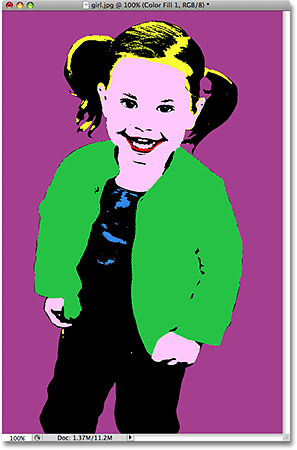
This tutorial is from our Photo Effects series. Let's get started!
Step 1: Draw A Selection Around The Main Subject Of Your Photo
In order to create our pop art effect, we need the subject of our image to be separated from its background and placed on its own layer above the Background layer, which means we need to first select the main subject.
You can use any selection tool you want here because you don't have to be overly precise with your selection, since we're going to be removing most of the details from the image anyway. I used the Lasso tool, but if you prefer the Pen tool, for example, that works too. Go ahead and draw a selection around the main subject of your photo:

Step 2: Copy The Main Subject Onto A New Layer
With the main subject of your photo selected, use the keyboard shortcut Ctrl+Alt+J (Win) / Command+Option+J (Mac) to copy the selection onto its own layer. Adding that Alt/Option key into the keyboard shortcut tells Photoshop to first give us the New Layer dialog box so that we can name our layer before it's created:

I named my new layer "threshold", and we'll see why in just a moment. Click OK when you're done, and Photoshop copies your selection onto a new layer above the Background layer:

Step 3: Add A Solid Color Fill Layer Below The New Layer
Now that we have the main subject on its own layer, we're going to hide the background from view and replace it with a solid color. First, click on the Background layer to select it. Then, with the Background layer selected, click on the New Fill Or Adjustment Layer icon at the bottom of the Layers palette:

We want a solid color behind the main subject, so select Solid Color from the top of the list that appears:

This brings up Photoshop's Color Picker. Go ahead and choose any color you want right now for the background. It doesn't matter which color you pick because, as we'll see later, you can always go back and choose a different color any time you want. I'm going to choose a light blue for now:

Click OK when you've chosen a color to exit out of the Color Picker. Here's my image with my solid colored background:

And I can now see in my Layers palette that I have a solid color fill layer between my Background layer and the "threshold" layer:

Step 4: Use The Threshold Adjustment To Remove The Detail From The Main Subject
Next we need to convert the main subject to black and white and remove most of the detail, and we can do that easily using Photoshop's Threshold adjustment. First, click back on the "threshold" layer to select it in the Layers palette. Then, go up to the Image menu at the top of the screen, select Adjustments, and then select Threshold. This brings up the Threshold dialog box:

Drag the slider at the bottom of the Threshold dialog box (circled in red above) until you've removed most of the details from the image, leaving just enough to still be able to make out the main areas. In my case, I've left just enough detail to still be able to make out the girl's eyes, nose, mouth, and so on, yet the majority of the image detail is now gone:

Click OK when you're done to exit out of the Threshold adjustment.
Step 5: Select The First Area Of Your Subject To Colorize And Copy It To Its Own Layer
In order to create the pop art effect, we need to be able to colorize the different areas of our main subject separately from each other, and in order to do that, we need to select each area and place it on its own layer. Again, using the Lasso tool or the selection tool of your choice, draw a selection around the first area of your main subject that you want to colorize. I'm going to start with the girl's hair:
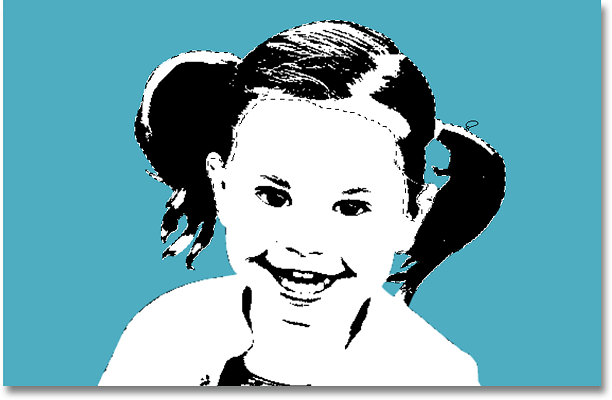
Next, with her hair selected, I'm going to copy her hair onto its own layer, using the same keyboard shortcut as before, Ctrl+Alt+J (Win) / Command+Option+J (Mac), which brings up the New Layer dialog box once again. Give this layer a descriptive name. I'm going to name mine "hair":

Click OK, and Photoshop adds the selection onto its own layer above the "threshold" layer:

Step 6: Continue Selecting All Areas And Copying Them To New Layers
Continue making selections around each of the areas that you're going to want to colorize separately and copying each area onto its own layer until you're done. Make sure you click back on the "threshold" layer each time after you've made a selection, and then use the same keyboard shortcut, Ctrl+Alt+J (Win) / Command+Option+J (Mac) to copy the selection to its own layer. Also, make sure you give the new layer a descriptive name.
I've gone ahead and made selections around each area of the girl I'm going to want to colorize and I've copied each area onto its own layer in the Layers palette:

Step 7: Colorize Your First Section With A Solid Color Fill Layer
With each of the sections we want to colorize selected and copied onto their own layer, the hard part is done. We're now at the fun and easy part - colorizing each section. To do that, we're going to give each section its own solid color fill layer. I'm going to start at the very top of my Layers palette with the girl's hair.
First, I'm going to click on her "hair" layer in the Layers palette to select it. Then, I'm going to hold down my Alt (Win) / Option (Mac) key and click on the New Fill Or Adjustment Layer icon at the bottom of the Layers palette:

Then, while still holding Alt/Option, select Solid Color from the top of the list:

Holding down the Alt/Option key tells windows to bring up the New Layer icon for us before adding the solid color layer. Give your solid color layer a descriptive name. Since mine is going to be used to colorize the girl's hair, I'm going to name mine "hair color".
Also, make sure you select the Use Previous Layer To Create Clipping Mask option this time:

If you don't select it, your solid color will cover the entire image, which isn't what we want. Choosing this option will make sure the color only fills the area inside the selection, which in my case here is the girl's hair.
Click OK, and Photoshop's Color Picker appears. Again, choose any color you want because you can go back and change it any time. I'm going to choose orange for her hair, and then click OK.
I can now see my orange solid color fill layer above the "hair" layer in the Layers palette. It's indented to the right and has a small down-pointing arrow on the left to indicate that it's being "clipped" by the layer below it, preventing it from covering the entire image area:

Here's what the girl's hair currently looks like:

Step 8: Change The Blend Mode Of The Solid Color Fill Layer To Multiply
Her hair is now orange, but there's a problem. The orange is covering all of the black areas that were in her hair. To fix that, with the orange fill color layer selected, go up to the layer blend mode options at the top of the Layers palette, click on the down-pointing arrow to the right of the word "Normal", and change the blend mode for the orange fill color layer to Multiply:

Now the black areas in her hair are visible once again:

Step 9: Continue Adding Solid Color Fill Layers For Each Section
Repeat steps 7 and 8, adding solid color fill layers for each section, remembering each time to select that Use Previous Layer To Create Clipping Mask option in the New Layer dialog box so that your fill color affects only that specific selection and not the entire image. Again, feel free to pick any colors you want for each section since you can always change them. When you're done, you should have a solid color fill layer above each section's layer in the Layers palette, and your image will be completely colorized.
Remember that layers higher up in the Layers palette can block lower layers from view, so you may have to click and drag some layers above others in order to colorize them if some sections in your image are overlapping.
Here's my image after adding a solid color fill layer to each section and changing the blend mode of each one to "Multiply":
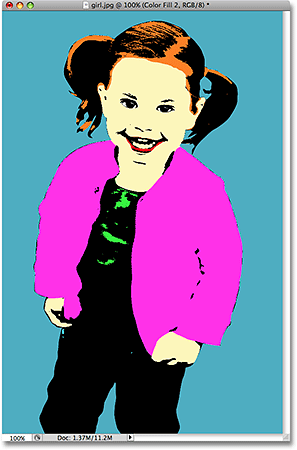
The pop art effect is now complete, and the nice thing is, I can now go back and change any colors I want, as we'll see next.
Step 10: Change Any Colors You Want Whenever You Want
The nice thing about the way we've accomplished this effect is that each of our colors is a separate fill layer, and fill layers are always "live", meaning we can go back and select different colors any time we want. To change any of the colors, simply double-click on the color swatch for that fill layer in the Layers palette:

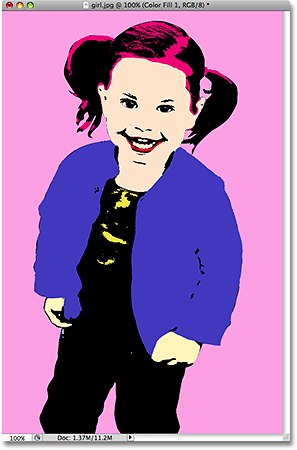
This will bring the Color Picker back up. Choose a different color, and then click OK. You can change any or all of the colors in the image whenever you want. I'll go ahead and change all of the colors in my image.
[ ads - bottom - float - left ]
And again, here's the same image with different colors:
Save your completed effect as a Photoshop .PSD file so that you can open it again any time you need to and change the colors to create different results.
And there we have it! That's how to create a simple pop art effect in Photoshop! Check out our Photo Effects section for more Photoshop effects tutorials!